Helm cheat sheet⚓︎
Helm cheatsheet featuring all the necessary commands required to manage an application through Helm.
Basic interpretations/context:⚓︎
-
Chart:
- It is the name of your chart in case it has been pulled and untarred.
- It is
/ in case the repository has been added but chart not pulled. - It is the URL/Absolute path to the chart.
-
Name: It is the name you want to give to your current helm chart installation.
-
Release: Is the name you assigned to an installation instance.
-
Revision: Is the value from the Helm history command.
-
Repo-name: The name of a repository.
-
DIR: Directory name/path.
Commands⚓︎
Chart Management⚓︎
helm create <name>                        # Creates a chart directory along with the common files and directories used in a chart.
helm package <chart-path>                 # Packages a chart into a versioned chart archive file.
helm lint <chart>                         # Run tests to examine a chart and identify possible issues:
helm show all <chart>                     # Inspect a chart and list its contents:
helm show values <repo-name>/<chart-path> # Displays the contents of the values.yaml file
helm pull <chart>                         # Download/pull chart
helm pull <chart> --untar=true            # If set to true, will untar the chart after downloading it
helm pull <chart> --verify                # Verify the package before using it
helm pull <chart> --version <number>      # Default-latest is used, specify a version constraint for the chart version to use
helm dependency list <chart>              # Display a list of a chart’s dependencies:
Install and Uninstall Apps⚓︎
helm install <name> <chart>                           # Install the chart with a name
helm install <name> <chart> --namespace <namespace>   # Install the chart in a specific namespace
helm install <name> <chart> --set key1=val1,key2=val2 # Set values on the command line (can specify multiple or separate values with commas)
helm install <name> <chart> --values <yaml-file/url>  # Install the chart with your specified values
helm install <name> <chart> --dry-run --debug         # Run a test installation to validate chart (p)
helm install <name> <chart> --verify                  # Verify the package before using it
helm install <name> <chart> --dependency-update       # update dependencies if they are missing before installing the chart
helm uninstall <name>                                 # Uninstall a release
Perform App Upgrade and Rollback⚓︎
helm upgrade <release> <chart>                            # Upgrade a release
helm upgrade <release> <chart> --atomic                   # If set, upgrade process rolls back changes made in case of failed upgrade.
helm upgrade <release> <chart> --dependency-update        # update dependencies if they are missing before installing the chart
helm upgrade <release> <chart> --version <version_number> # specify a version constraint for the chart version to use
helm upgrade <release> <chart> --values                   # specify values in a YAML file or a URL (can specify multiple)
helm upgrade <release> <chart> --set key1=val1,key2=val2  # Set values on the command line (can specify multiple or separate valuese)
helm upgrade <release> <chart> --force                    # Force resource updates through a replacement strategy
helm rollback <release> <revision>                        # Roll back a release to a specific revision
helm rollback <release> <revision>  --cleanup-on-fail     # Allow deletion of new resources created in this rollback when rollback fails
List, Add, Remove, and Update Repositories⚓︎
helm repo add <repo-name> <url> # Add a repository from the internet:
helm repo list                  # List added chart repositories
helm repo update                # Update information of available charts locally from chart repositories
helm repo remove <repo_name>    # Remove one or more chart repositories
helm repo index <DIR>           # Read the current directory and generate an index file based on the charts found.
helm repo index <DIR> --merge   # Merge the generated index with an existing index file
helm search repo <keyword>      # Search repositories for a keyword in charts
helm search hub <keyword>       # Search for charts in the Artifact Hub or your own hub instance
Helm Release monitoring⚓︎
helm list                                 # Lists all of the releases for a specified namespace, uses current namespace context if namespace not specified
helm list --all                           # Show all releases without any filter applied, can use -a
helm list --all-namespaces                # List releases across all namespaces, we can use -A
helm list -l key1=value1,key2=value2      # Selector (label query) to filter on, supports '=', '==', and '!='
helm list --date                          # Sort by release date
helm list --deployed                      # Show deployed releases. If no other is specified, this will be automatically enabled
helm list --pending                       # Show pending releases
helm list --failed                        # Show failed releases
helm list --uninstalled                   # Show uninstalled releases (if 'helm uninstall --keep-history' was used)
helm list --superseded                    # Show superseded releases
helm list -o yaml                         # Prints the output in the specified format. Allowed values: table, json, yaml (default table)
helm status <release>                     # This command shows the status of a named release.
helm status <release> --revision <number> # if set, display the status of the named release with revision
helm history <release>                    # Historical revisions for a given release.
helm env                                  # Env prints out all the environment information in use by Helm.
Download Release Information⚓︎
helm get all <release>      # A human readable collection of information about the notes, hooks, supplied values, and generated manifest file of the given release.
helm get hooks <release>    # This command downloads hooks for a given release. Hooks are formatted in YAML and separated by the YAML '---\n' separator.
helm get manifest <release> # A manifest is a YAML-encoded representation of the Kubernetes resources that were generated from this release's chart(s). If a chart is dependent on other charts, those resources will also be included in the manifest.
helm get notes <release>    # Shows notes provided by the chart of a named release.
helm get values <release>   # Downloads a values file for a given release. use -o to format output
Plugin Management⚓︎
helm plugin install <path/url> # Install plugins
helm plugin list               # View a list of all installed plugins
helm plugin update <plugin>    # Update plugins
helm plugin uninstall <plugin> # Uninstall a plugin
ZSH + ABBR
Récupérer un fichier values.yaml d'une charts helm⚓︎
helm show values cilium > test-values.yaml
Helm is often called “the app store for Kubernetes”, because it makes deploying applications to clusters incredibly easy.
Instead of manually writing dozens of YAML files, Helm bundles everything into reusable packages called Charts — letting teams install complex apps with one command.
✔ Clear descriptions
✔ Practical examples
✔ Real-world scenarios
✔ Helm architecture
✔ Best practices
A Short History of Helm⚓︎
Helm was originally created in 2015 during a Kubernetes hackathon.
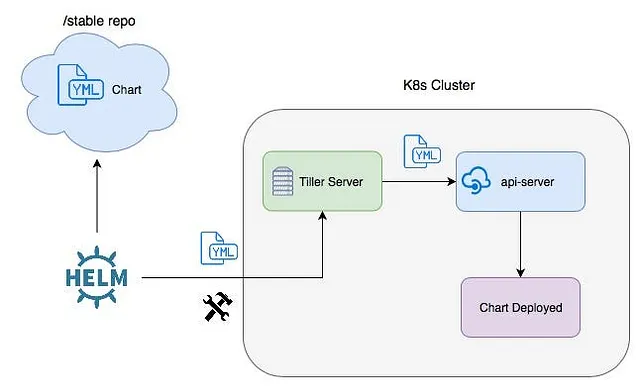
- Helm v2 (2017) required a server component called Tiller
- Helm v3 (2019) removed Tiller → more secure
- Today it’s the de facto Kubernetes package manager
Used by:
✔ DevOps teams
✔ Cloud engineers
✔ SREs
✔ Platform engineering teams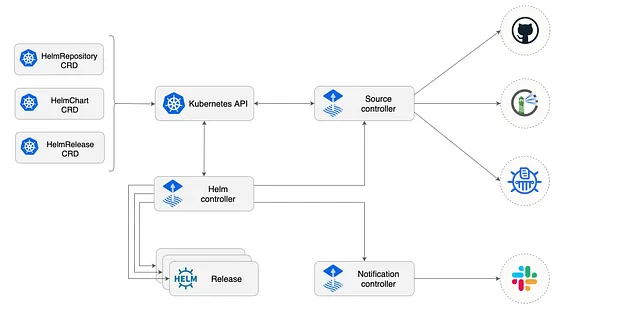
Helm Architecture (Simple Explanation)⚓︎
Helm has three main components:
- Chart: A packaged application containing Kubernetes YAML templates.
- Repository: A place where charts are stored & shared (like Docker registry).
- Release: An installed chart running inside a Kubernetes cluster.
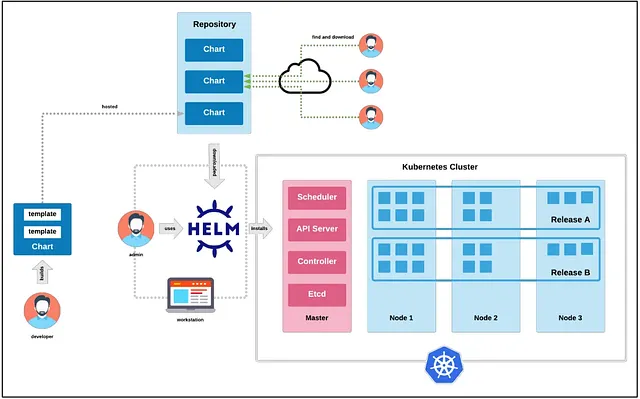
Example workflow:
REAL-WORLD USE CASES OF HELM⚓︎
- Deploying production-grade apps: Nginx, Redis, Elasticsearch, Prometheus, etc.
- Rolling updates in Kubernetes: Upgrade apps without downtime with
helm upgrade. - Managing microservices: Each microservice = one Helm chart.
- GitOps automation: FluxCD, ArgoCD use Helm heavily.
Basic Helm commands⚓︎
Displays help for Helm or any subcommand.
Use-case: Add Bitnami, stable, or internal repos.
Installing & upgrading charts⚓︎
Real-world use: install Redis, Prometheus, Kafka, etc.Working with helm charts⚓︎
Creates default templates: Deployment, Service, Ingress, values.yaml.
Catches YAML + template errors.
Use-case: Preview manifests for GitOps.
Advanced helm commands⚓︎
Helm repo management⚓︎
26. helm repo update — Update repo cache⚓︎
(Same as earlier)
Use-case: Host private chart repositories (internal DevOps).
Helm values & customization⚓︎
32. helm uninstall --purge⚓︎
(Used in Helm v2 only)
Template & debugging commands⚓︎
HELM + KUBERNETES INTEGRATION⚓︎
Helm chart development⚓︎
HELM WITH KUBECONFIG CONTEXTS⚓︎
helm install myapp ./chart --kube-context dev-cluster
helm upgrade myapp ./chart --kube-context prod-cluster
helm list -n default --kube-context staging-cluster
HELM CHART DEPENDENCIES⚓︎
HELM HISTORY & ROLLBACKS⚓︎
REAL-WORLD HELM ARCHITECTURE EXAMPLE⚓︎
Here’s an example high-level architecture using Helm:
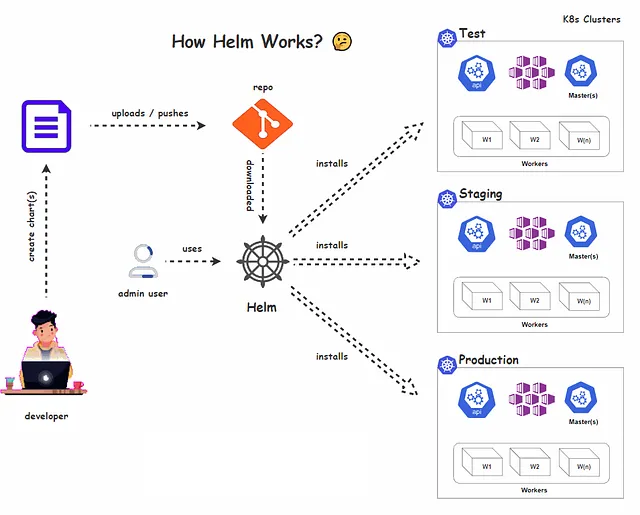
Scenario: Deploying Prometheus + Grafana stack⚓︎
Using Bitnami Helm charts:
helm repo add bitnami https://charts.bitnami.com/bitnami
helm install monitoring bitnami/kube-prometheus
helm install grafana bitnami/grafana --set adminPassword=admin123
Benefits⚓︎
✔ Easy rollback
✔ Customizable values
✔ Production-ready configs
✔ Repeatable deployments
Conclusion⚓︎
Helm remains one of the most powerful tools in the Kubernetes ecosystem.
This guide covered:
✔ Helm basics
✔ Chart installation & upgrades
✔ Repo management
✔ Dependency handling
✔ Debugging templates
✔ Production Helm workflows
✔ Real-world architecture examples